In the realm of monitoring and observability, understanding and effectively utilizing query languages is crucial. LogQL, a powerful query language designed for querying logs in Loki, has gained significant popularity for its flexibility and efficiency. One of its key features is pattern matching, which allows users to filter and extract relevant log entries based on specific criteria. In this guide, we’ll delve into LogQL’s pattern matching capabilities, exploring its syntax and usage with detailed examples.
Understanding LogQL Pattern Matching
Loki v2.3.0 introduced the pattern parser. It is both simple to use and super efficient at extracting data from unstructured logs. LogQL pattern matching enables users to filter log entries based on patterns defined by regular expressions. These patterns can target specific parts of log messages, such as timestamps, log levels, or custom attributes, allowing for precise querying and analysis.
Usage
Invoke the pattern parser within a LogQL query by specifying:
| pattern "<pattern-expression>"
or
| pattern `<pattern-expression>`
<pattern-expression> specifies the structure of a log line. It is composed of captures and literals.
A capture defines a field name and is delimited by the < and > characters. In the example, <status> defines the field name status. The unnamed capture <_> skips and ignores matched content within the log line.
Captures are matched from the beginning of the line, or from the previous set of literals to the end of the line, or to the next set of literals. If a capture does not match, the pattern parser stops processing the log line. By default, pattern expressions are anchored at the beginning of the log line. If you want to change this behavior, start your expression with an unnamed capture, <_>.
Practical example
We will search access logs of an nginx container and extract status code and request using pattern parse.
nginx.conf custom log_format
http {
    log_format   main '$remote_addr - $remote_user [$time_local]  $status '
            '"$request" $body_bytes_sent "$http_referer" '
            '"$http_user_agent" "$http_x_forwarded_for"'
}
Given, a simple query without pattern parser:
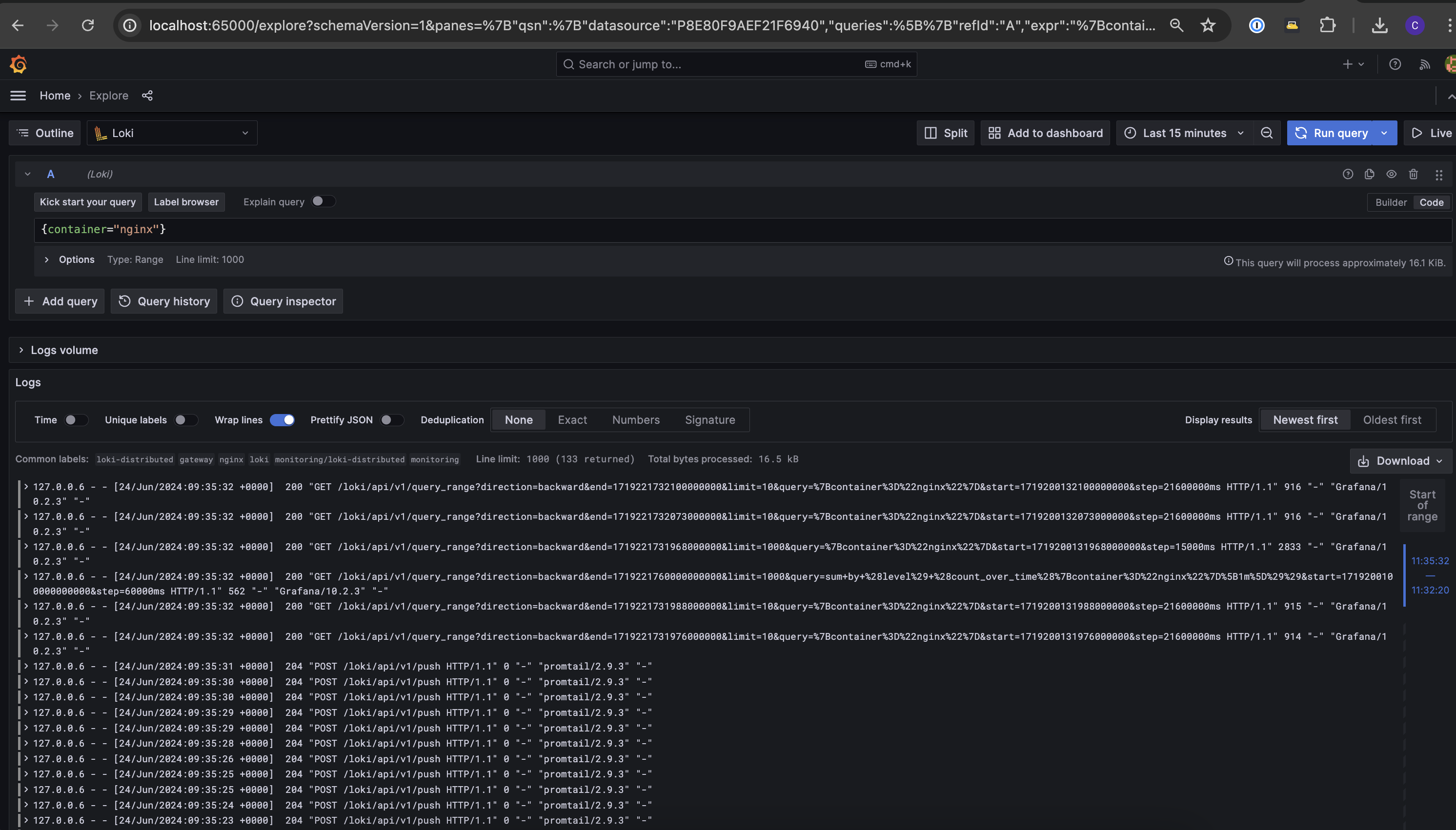
Attributes on each log line are as follows:
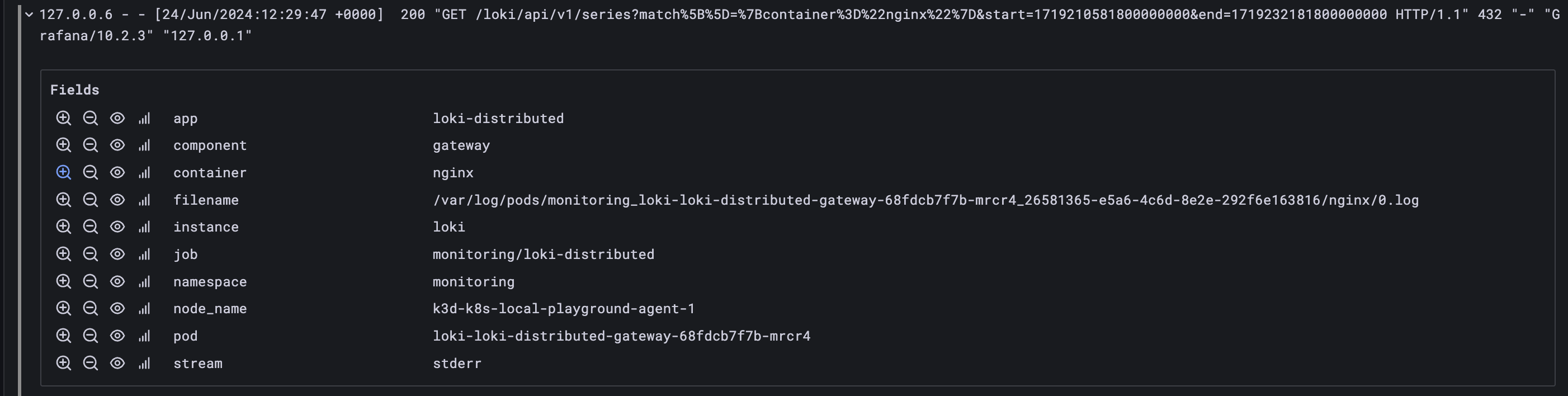
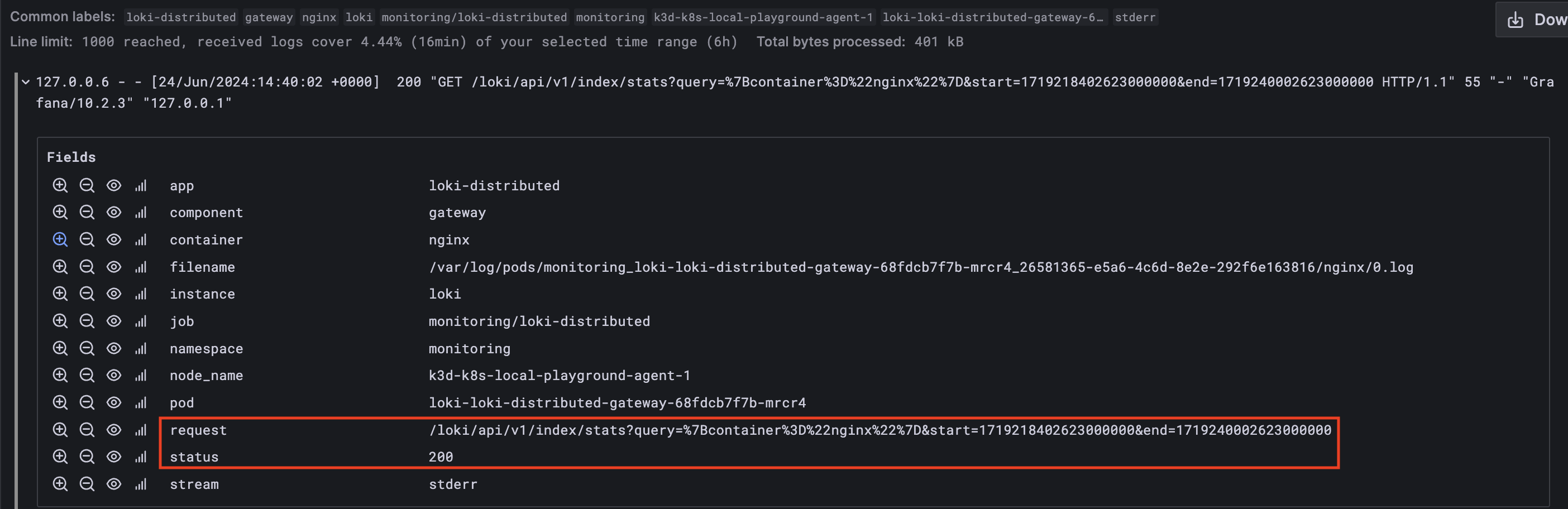
Now we will use pattern parser to retrieve the status and request in specific attributes so that they can be filtered.
| NGINX log line fields | NGINX sample | pattern expression |
|---|---|---|
| $remote_addr | 127.0.0.6 |
<_> |
| - | - | - |
| $remote_user | - | - |
| [$time_local] | [24/Jun/2024:12:47:28 +0000] |
[<_> <_>] |
| $status | 200 |
<status> |
| “$request” | "GET /loki/api/v1/index/stats?query=%7Bcontainer |
"<_> <request> <_>" |
%3D%22nginx%22%7D&start=1719211648650000000 |
||
&end=1719233248650000000 HTTP/1.1" |
||
| $body_bytes_sent | 55 | <_> |
| “$http_referer” | “-” | "-" |
| “$http_user_agent” | "Grafana/10.2.3" |
"<_>" |
| “$http_x_forwarded_for” | "127.0.0.1" |
"<_>" |
127.0.0.6 - - [24/Jun/2024:12:47:28 +0000] 200 "GET /loki/api/v1/index/stats?query=%7Bcontainer%3D%22nginx%22%7D&start=1719211648650000000&end=1719233248650000000 HTTP/1.1" 55 "-" "Grafana/10.2.3" "127.0.0.1"
{container="nginx"} | pattern `<_> - - [<_> <_>] <status> "<_> <request> <_>" <_> "-" "<_>" "<_>"`
With above pattern applied we are now able to utliise status and request attribute for filtering.
Some bonus examples
a. Mind spaces in your logs when building pattern to match
Log sample: "foo buzz bar"
Pattern sample: "foo <foo> bar"
Captured attribute: "buzz"
b. You can capture spaces as values too
Log sample: " bar "
Pattern sample: "<foo>bar<baz>"
Captured attribute: " ", " "
c. Use unique attributes to capture values
Log sample: "/api/plugins/versioncheck?slugIn=snuids-trafficlights-panel,input,gel&grafanaVersion=7.0.0-beta1"
Pattern sample: "<path>?<_>"
Captured attribute: "/api/plugins/versioncheck"
d. Use as many attributes as you wish
Log sample: "127.0.0.1 user-identifier frank [10/Oct/2000:13:55:36 -0700] "GET /apache_pb.gif HTTP/1.0" 200 2326"
Pattern sample: "<ip> <userid> <user> [<_>] "<method> <path> <_>" <status> <size>"
Captured attributes: "127.0.0.1", "user-identifier", "frank", "GET", "/apache_pb.gif", "200", "2326"
e. Use unnamed matcher <_> when you don’t want to capture values in unique attributes
Log sample: "35.191.8.106 - - [19/May/2021:07:21:49 +0000] "GET /api/plugins/versioncheck?slugIn=snuids-trafficlights-panel,input,gel&grafanaVersion=7.0.0-beta1 HTTP/1.1" 200 107 "-" "Go-http-client/2.0" "80.153.74.144, 34.120.177.193" "TLSv1.3" "DE" "DEBW""
Pattern sample: "<ip> - - [<_>] "<method> <path> <_>" <status> <size> "
Captured attributes: "35.191.8.106", "GET", "/api/plugins/versioncheck?slugIn=snuids-trafficlights-panel,input,gel&grafanaVersion=7.0.0-beta1", "200", "107"
f. Start your pattern with unnamed matcher <_> when you want to match only a substring of your log line:
Log sample: level=debug ts=2021-05-19T07:54:26.864644382Z caller=logging.go:66 traceID=7fbb92fd0eb9c65d msg="POST /loki/api/v1/push (204) 1.238734ms"
Pattern sample: <_> msg="<method> <path> (<status>) <duration>"
Captured attributes: "POST", "/loki/api/v1/push", "204", "1.238734ms"
TL;DR:
Try to create the pattern as similar to the log line you want to match against. While doing so, you can use unnamed matcher <_> to ignore capturing the value. Pattern matcher is faster then regex and thus significantly improves query performance and is a swiss knife in your “querying” arsenal.
Happy querying.